What’s New in Microsoft 365 – May 2026
Wednesday, May 20, 2026
Microsoft 365 continues to introduce updates designed to improve collaboration, communication and productivity across Teams, Outlook, SharePoint and Copilot.
Microsoft Outlook: New People Hub Experience on the Web
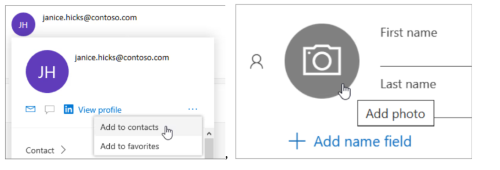
Microsoft is introducing an updated People Hub experience in Outlook on the web with a redesigned layout, improved search capabilities and enhanced contact management features. Users will see a more modern contacts experience that can automatically link duplicate contacts and display additional organizational profile information when available.
The updated People Hub will become the default experience for Outlook on the web users, and the option to switch back to the previous Contacts experience will be removed.
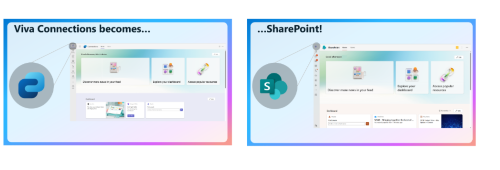
Microsoft Teams: Viva Connections App Renamed to SharePoint App
Microsoft is renaming the Viva Connections app in Microsoft Teams to the SharePoint app and updating the SharePoint home site experience within Teams. Faculty, staff and students may notice the updated app name within Teams along with enhancements to how University announcements, resources and important links are displayed. Existing functionality, permissions and access to content will remain unchanged.
Microsoft Teams: Delete Meeting Recap Content
Microsoft Teams meeting organizers will soon be able to delete meeting-generated content directly from the meeting recap page. This includes recordings, transcripts, AI-generated summaries and meeting notes.
A new Delete recap content option will appear in the meeting recap menu for eligible meetings. Deleted recap content cannot be restored. Shared files associated with the meeting will not be deleted and will remain available in their original storage locations.
Microsoft Teams: Simplified Teams App Bar Experience
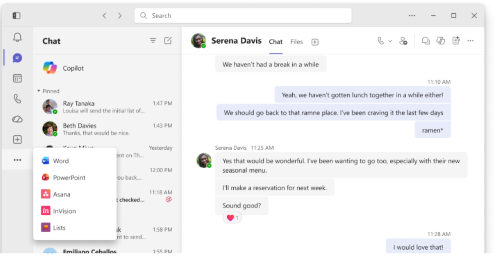
Microsoft Teams is introducing a simplified app bar experience on Windows and Mac desktops to create a cleaner and more focused workspace. Users may notice fewer visible items in the Teams app bar, while additional apps will be grouped into an updated View more apps menu designed to simplify navigation.
Teams users will also have the option to show or hide the app bar to create additional screen space while working. Keyboard shortcuts for this feature include Ctrl + \ on Windows and Cmd + \ on Mac.
Microsoft Teams: Meeting Recording Expiration Emails Will Continue
Microsoft has paused its planned change to disable Teams meeting recording expiration notification emails following customer feedback. Faculty, staff and students will continue receiving email notifications when Teams meeting recordings are approaching expiration.
Upcoming Microsoft 365 Updates
Microsoft Teams: New Meeting Lobby and Anonymous Join Settings Effective June 8
Microsoft Teams meeting settings are being updated to change how external participants join meetings. External users will no longer be able to join meetings anonymously without signing in and will need to authenticate with a recognized account or join as an approved guest user.
The meeting lobby experience will also change. Seton Hall members and authenticated guest users will continue joining meetings directly, while anonymous participants and dial-in callers will wait in the lobby until admitted by the meeting organizer, co-organizer or presenter. Meeting organizers and presenters will also continue to have the ability to remove attendees from meetings if needed.
Additional instructions for admitting lobby participants and removing attendees are available in the related how-to article.
Microsoft Teams: Phone Call Transfer Improvements (June 2026)
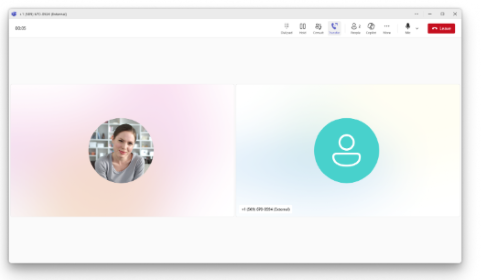
Microsoft is updating the Teams Phone call transfer experience in Microsoft Teams for desktop users on Windows and Mac. The Transfer and Consult transfer options will appear as separate buttons during calls, making it easier to transfer calls.
Teams will also begin suggesting frequent transfer contacts based on previous activity to help users find commonly used contacts faster. Call transfers will now default to immediately sending the call to the recipient instead of waiting for the recipient to answer first. Users who prefer the previous transfer behavior can still enable the Ring Back option during the transfer process.
Microsoft Teams: Teams Live Events Retirement (June 2026)
Organizations currently using Teams Live Events for large virtual events or broadcasts are encouraged to transition to Teams town halls, which Microsoft now recommends as the replacement experience for large-scale events.
After June 30, 2026, users will no longer be able to schedule new Teams Live Events. Existing Teams Live Events scheduled before that date will continue to function through February 2027.
OneDrive and SharePoint: Noise Suppression Option Removed from Video Playback (August 2026)
Microsoft will remove the noise suppression option from video playback controls for videos viewed in OneDrive and SharePoint on the web. This change only affects the playback experience and does not modify existing video or audio files. Other video playback features, including captions, transcripts and playback speed controls, will remain available.
Categories: Science and Technology