What’s New in Microsoft 365 – June 2026
Monday, June 15, 2026
Microsoft Copilot: In-App Features Limited to Licensed Users
Microsoft has updated Copilot licensing, and Copilot features within Word, Excel, PowerPoint and OneNote are now available only to users with a Microsoft 365 Copilot license. Users without a license can continue to use Copilot Chat through the Microsoft 365 Copilot app or on the web for AI-powered assistance, and Copilot features in Outlook remain available.
Microsoft Teams: Delete Meeting Recap Content
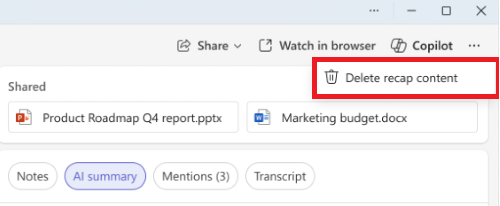
Microsoft Teams now allows meeting organizers to delete meeting-generated content directly from the Recap page. This includes recordings, transcripts, AI-generated summaries and meeting notes, making it easier to manage content after a meeting has ended.
Deleted content is permanently removed and cannot be restored. Files shared during the meeting are not affected and will remain available in their original locations.
Microsoft Teams: New Meeting Chats Section
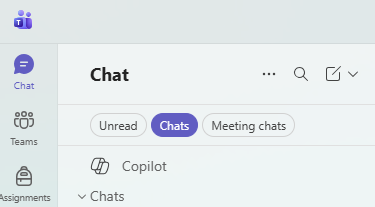
Teams has introduced a new Meeting chats section that groups conversations associated with meetings into a dedicated area of the chat list. This makes it easier to find and manage discussions tied to classes, meetings and events without scrolling through other chats.
Microsoft Teams: Profanity Filter Disabled by Default for Live Captions
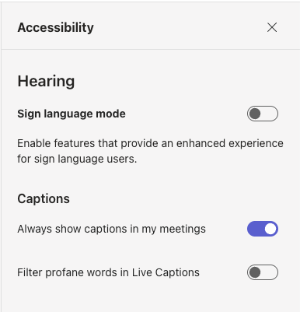
Microsoft Teams will now disable the profanity filter for live captions by default, allowing captions to more accurately reflect what is spoken during meetings, calls and events. This change is intended to improve caption accuracy and accessibility for participants who rely on live captions. The profanity filter can be enabled or disabled at any time by selecting the Settings icon in the live captions window and choosing the preferred profanity filter option.
Coming Soon to M365
SharePoint: Create Custom AI Skills for Repetitive Tasks (July Update)
SharePoint will introduce custom AI skills, allowing users to teach AI how to perform common tasks in a consistent way. Instead of repeating the same instructions each time, users can create reusable prompts that guide AI through specific processes, such as reviewing documents for required information, summarizing reports in a preferred format or organizing content according to established standards. Skills are created using natural language and operate within SharePoint's existing permissions and security controls.
Microsoft Teams: Refreshed Meeting Controls and Sharing Experience (August Update)
Microsoft Teams will introduce a redesigned meeting experience that makes controls
easier to find and content sharing more intuitive. Frequently used controls, such
as microphone, camera and screen sharing, will be grouped together in a simplified,
center-aligned layout, while less commonly used options will move to a reorganized
More menu. 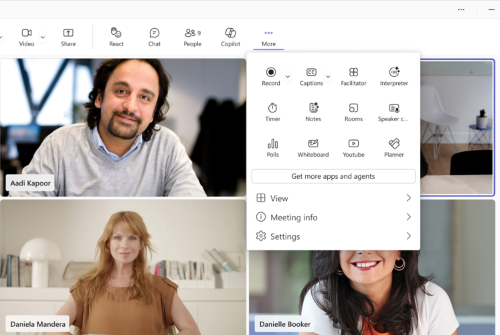
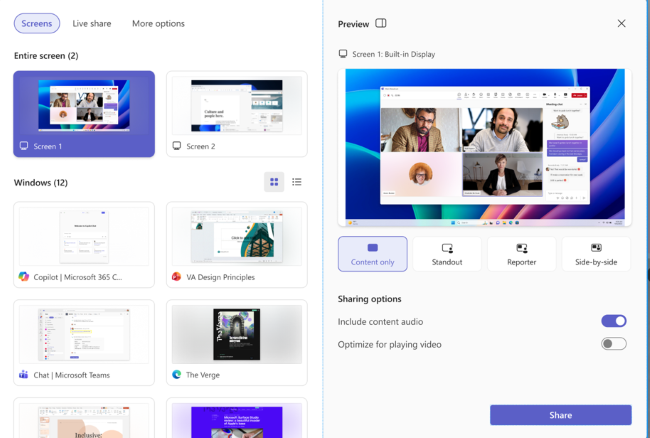
Teams will also introduce a redesigned sharing experience with live previews of screens and windows, a more organized sharing panel and an additional confirmation step to help prevent accidental sharing of the wrong content.
Microsoft Teams: AI Meeting Recaps Without Recordings or Transcripts (August Update)
Microsoft Teams will introduce a new option for Microsoft 365 Copilot users that can generate an AI-powered meeting recap without saving a meeting recording or transcript. This provides a way to capture key discussion points, decisions and action items while reducing the need to retain meeting content.
Meeting organizers with a Microsoft 365 Copilot license will be able to enable or disable this feature before or during a meeting. When enabled, Copilot will create a post-meeting summary that participants with Copilot access can review after the meeting. No recording or transcript will be saved as part of this experience.
Categories: Science and Technology